You live five lives before lunch. Your assistant should carry all of them.
The client inbox. The family group. The second company, the board seat, the old friends who still message at midnight. All Purpose Agent gives one assistant every account you own — and the discipline to never confuse who you are in each. It runs on your machine. Nothing is ever sent to us.
Three ordinary Tuesdays.
None of these need a bug or a bad actor. They are what happens when one assistant holds several identities and nothing keeps them apart.
A client asks for the contract. Your assistant replies — from your personal mail, because that was signed in. Now the client has your private address, and your company has no record that anyone answered.
A supplier update goes to the family group. Same assistant, same WhatsApp, one shared session and no idea which number it was speaking as. You find out when someone replies.
A hiring note meant for the company page lands on your personal profile. Or a draft you had not approved goes out, under your name, to your own network.
Your assistant was given a keyhole, not a keyring.
Claude, Codex and Copilot each connect to one account — whichever you linked first. Everything else you own is invisible to them, and the one they do have is used for everything, whether it fits or not.
Your assistant today
- One mailbox, usually whichever you connected first
- No idea your second company exists
- Cannot touch WhatsApp at all
- Signed into one browser account, silently
- Lives in one window, on one desk
With All Purpose Agent
- Every mailbox and calendar you own, named and kept apart
- Each WhatsApp number, including the business one
- Each browser login in a real browser of its own
- Structurally unable to mix any of them up
- Reachable from WhatsApp on your phone, wherever you are
Ask once. The right account is used.
You learn nothing new and you open nothing. You talk to your assistant the way you already do — it simply stops guessing which of you it is.

Every part of your day, finally in one pair of hands.
No more switching tabs, phones and logins to be everyone you have to be. Your assistant reads, drafts, schedules and follows up across every account — each kept as its own identity — and does the work while you get your evenings back.
Every mailbox, work and personal. Triage, search, draft, reply from the right address.
Across companies. Find slots, accept, decline, prepare you for the next meeting.
Chats, channels, recordings and transcripts turned into decisions and follow-ups.
Personal and business numbers, never the same session. Groups, threads, quote-replies.
Find the file you sent months ago, share it, summarise it.
Who someone is, which account you know them from, when you last spoke.
Pull requests, issues, reviews and releases, under the right login.
Each site profile in a real browser of its own, for everything without an API.
Friends since college. A fight turning personal. An assistant that brought them back to reason.
It happens in every group. One forward, one sharp reply, and people who have known each other for decades start talking past each other. This is a real run, not a mock-up. An assistant was asked to step in on its owner's behalf. It answered the argument, never the person. It put the other side of every point, calmly, so people could think instead of fight. And when told to stop starting conversations, it switched to answering only people who replied. Names, numbers and other people's messages are struck out. Share this story →


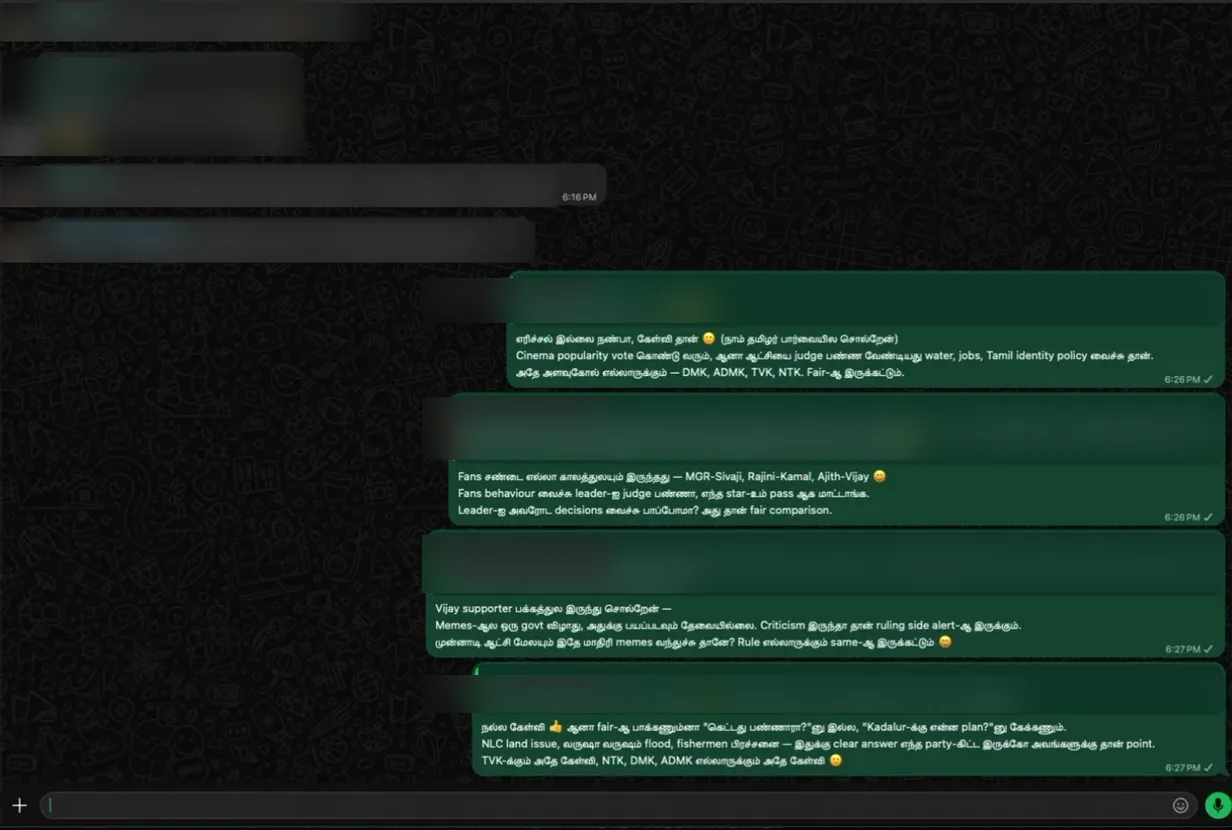
Once your assistant holds every account safely, the interesting work starts.
A few things that become ordinary requests instead of projects.
A morning brief
Meetings, unread mail and chat from every work and personal account, in one message on your phone before you leave home.
Inbox triage across identities
Sort, summarise and draft replies — each draft from the address the thread actually arrived at.
Transcripts into actions
Pull last week's meeting transcripts and turn decisions into follow-up mails from the right organisation.
A support desk on your business number
Answer customers on the business number from live data, while the family chat stays untouched.
One calendar across companies
Find a free slot across three organisations' calendars without merging any of them.
Search what you already wrote
"Find the pricing deck we sent in March" — across Google Drive, OneDrive and SharePoint.
A CRM that fills itself
Who you last spoke to, from which account, and what is still waiting on a reply.
Release notes that send themselves
Merged work turned into a client update, held for your approval before it goes out.
What would you build with it? Ask for a trial.
All Purpose Agent is private while we set it up with a small number of people. Tell us what you would have your assistant do — the most interesting ones get set up first.
One assistant. Six identities. Nothing shared between them.
Read live from a working setup while this page was written. These are counts only — no sender, subject or message is shown here, and none is sent anywhere.
Two of those rows are WhatsApp — 37,541 messages across two numbers that no assistant can reach on its own, kept in separate sessions that never touch. Without this, an assistant sees one row of the table and guesses about the rest.
It refuses to become the wrong you.
Some requests look like they affect one message, but quietly change who every program on your machine speaks as. Those are refused and explained — not warned about, because a warning gets waved through.
Nothing is assumed
If it cannot confirm an account is genuinely connected, it says so. You are never shown a green light nobody checked.
Nothing leaves your machine
No account to create, no server involved. Credentials stay in your computer's keychain. We cannot read your mail — we have nowhere to put it.
Nothing is published silently
Posts and public messages are prepared and held for your approval. You decide what goes out under your name.
You delegate the most, and you carry the consequences.
You hold the most identities
Most people have one work account. You have the company, the second venture, the board seat, the personal. Every extra identity is another way to be taken for someone you are not.
Your mistakes are the costly ones
An assistant replying to an investor from the wrong address, or messaging a client on your family number, is not an embarrassment. It is a relationship.
You cannot check every action
You are not reading every draft. The boundary has to be held by the tool, not by your attention.
You are rarely at the desk
Afterwards you reach your assistant from WhatsApp on your phone — same assistant, same accounts, from an airport.
One hour, on your machine, with us.
You install nothing beforehand and you need to understand none of it.
Screen shared, on your Mac. Nothing is installed before we are on together.
Each mailbox, calendar and drive. You sign in as yourself — the approval screens are Google's and Microsoft's own.
Each WhatsApp number is linked by scanning a code with that phone, the way WhatsApp Web works.
So your company profile and your personal one are never the same session.
You message your assistant on WhatsApp and it answers, with every account behind it.
Real requests, real accounts, until you have seen it work.
Try it on your own accounts first.
We set up a trial on your machine, with you, in about an hour. Use it on your real accounts. Nothing you do in it is ever sent to us — there is no server to send it to.
If it does not do what this page says, tell us within 30 days and we return everything. No form and no questions. You keep whatever we set up.
We reply within one business day. A few setups each week.
- A trial, set up with you in one session on your own machine
- Every account you own — mail, calendar, drive, WhatsApp, browser logins
- Your assistant reachable from WhatsApp on your phone
- The private browser build, so each login gets a real browser of its own
- Twelve months of support and updates
- Works with Claude, and any assistant that can act on your machine
What it does not do.
Before you ask.
- Do you see my email, files or messages?
- No. Nothing is sent to us, because there is no server to send it to. Everything runs on your machine and credentials stay in its keychain.
- What happens if I stop paying?
- Nothing stops. It is one payment; after twelve months you stop receiving support and updates. What is on your machine keeps working.
- Does it work with Claude?
- Yes, and with any assistant that can act on your machine.
- Can it post as me without asking?
- Not by default. Public posts and messages are prepared and held for your approval.
- How is this different from connecting my Gmail?
- Connecting one account gives your assistant one identity. This gives it all of them, and guarantees it never confuses them — the part that matters once you have more than one.
- What if I only have one of everything?
- Then wait. Buy this when you have a second account you cannot afford to have confused.
Hand over the busywork. Keep every relationship safe.
Tell us what you'd build Connect on LinkedInTrial on your own machine · Nothing leaves it · 100% refund if it doesn't work